On this page
- The lint screen is two parts; clean both after each program. 1
- The container filter is cleaned when you empty the container, but check it. 4
- CArE means run the basic appliance care program, about 1 hour. 23
- The intensive program takes about 4 hours, must not be canceled and needs the original care product. 2
- Cleaning and maintenance are not covered by the warranty. 4
How do I clean the lint screens in a Bosch dryer?#
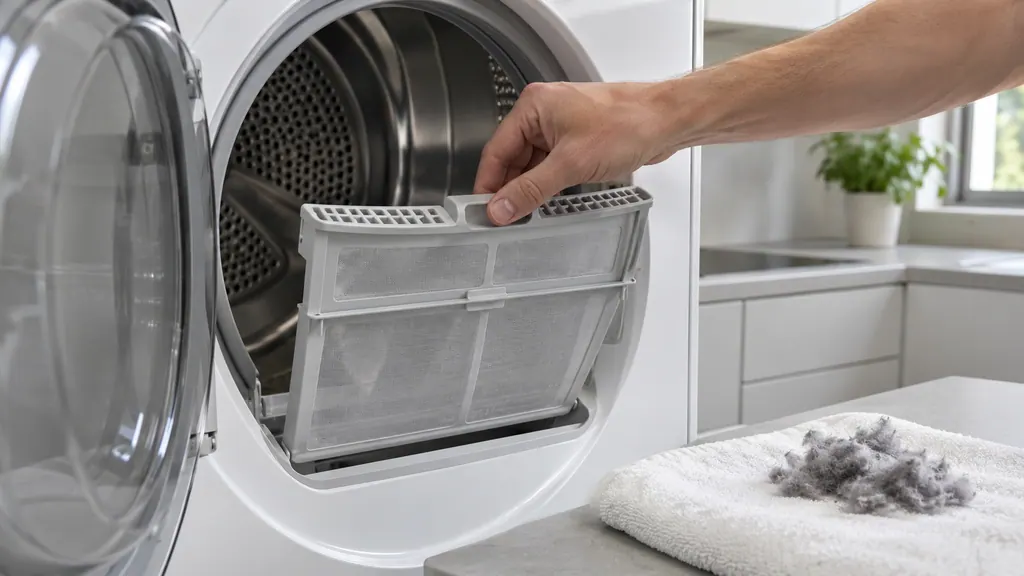
Open the door, remove the lint from the inside of the door, then take out the two-part lint screen one part at a time. Clean both parts under warm running water, dry them, put them together and slide the screen back in. Close the door. 1
The lint screen protects the dryer from lint. The manual asks you to clean it after the program has ended, or when the display shows a notification while the dryer is running. It also says the dryer's functionality may be impaired if you do not clean it as described. 1 Dispose of the lint with household waste, which the manual says keeps microplastics out of the water. 1
- 1
- 2
- 3
- 4
- 5
Our glossary entry for the lint screen describes the part.
What do I do with the condensation container?#
If the dryer collects condensation in its container, empty it when the program has finished or when the display says the program is paused. Pull it out level, empty it and push it back in as far as it will go before you run the dryer again. 5
Do not skip this. The troubleshooting page lists a full container as a reason the program stops: the display flashes and the program is terminated until you empty it. 6 If you drain the condensation through the water drain hose instead, the hose must be connected correctly and not kinked or trapped, and rinsed with tap water if it is blocked. 6
The container has a filter that catches lint carried in the condensation. The manual says the filter is cleaned automatically when you empty the container, but you should check it regularly and clean it if dirty. To do that, empty the container, take out the filter and clean it under warm running water, or in the dishwasher, then slide it in as far as it goes. 4 See the glossary entry for the condensation container.
How do I clean the moisture sensor?#
Open the door and clean the sensor with a sponge. The sensor measures how damp the laundry is, and the dryer changes the length of an automatic program based on it. Residue from limescale, detergent and care products can build up on it over time. 4
A dirty sensor can make laundry feel damp at the end of a program, because the dryer reads the load wrongly. The manual lists a dirty moisture sensor among the causes of laundry that is too damp. 6 Do not use hard or sharp objects, abrasive cleaners or steel wool. The manual says to clean the dryer with water and a soft cloth. 4 The moisture sensor entry shows what the part is.
What does CArE mean, and how do I run the care program?#
CArE means it is time to run the basic appliance care program. It removes light dirt deposits after a longer period of use and runs about 1 hour. For stubborn deposits, or odors after the dryer sat unused for more than a month, the intensive program runs about 4 hours. 26
Prepare the dryer first: put it in standby, clean the lint screen and empty the condensation container. If you drain the condensation through the hose, take the stopper from the recess in the top of the container and put it into the underside, as the manual shows. 2
| Program | When | Needs | Time |
|---|---|---|---|
| Basic appliance care | CArE on the display, or after a long period of use | About 6.3 cups (1.5 liters) of hot tap water in the container | About 1 hour 23 |
| Intensive appliance care | Stubborn deposits or odors after more than a month unused | A bottle of the original appliance care product plus 6.3 cups (1.5 liters) of hot tap water | About 4 hours; must not be canceled 23 |
For the basic program, pour the hot water into the container, hold it level, lock it in place, switch the dryer on, press Basic Settings, turn the program selector to position 5 until CP1 and the duration alternate, and press start. A tone sounds when it begins, and End with a tone when it is done. Then empty the container. 3 The intensive program pauses after about 3 hours so you can empty the container, add another 6.3 cups (1.5 liters) of hot water and press start again. 3
Is there anything I should not use to clean the dryer?#
Yes. Heavy, sharp or rough objects can damage it, so do not use hard or sharp tools, abrasive cleaning products or steel wool. Clean the outside with water and a soft cloth only. 4
The same rule holds for the inside parts you reach: the lint screens, container filter and sensor need only water, a sponge and your hands. If lint has built up in a place you cannot reach with those, that is a job for a technician, not for a stiff brush or a vacuum nozzle pushed into the machine.
What is the "Hot" message with the drum turning?#
It is not a problem. The troubleshooting table says the cooling process is active, and no action is needed. Do not change the program during cooling, which takes up to 10 minutes. 6
The same table says humming, whirring or pumping noises are not a problem either: the compressor, its ventilation or the condensation pump is working. 6 A heat pump dryer makes different noises from the vented dryers many people are used to, and the table treats these as normal. 6
Does the place where the dryer stands matter?#
Yes. The manual's troubleshooting table lists an ambient temperature below 59 degrees F (15 degrees C) or above 86 degrees F (30 degrees C), poor air circulation at the installation spot and a blocked ventilation opening as reasons for long drying times. Ventilate the room and keep the opening clear. 6
It names one more habit that affects the machine. A heat pump dryer cleans itself with the condensation from the laundry, and drying only small loads all the time does not make enough. The manual advises regularly drying a load of more than 6.6 lbs (3 kg) of damp laundry until the program ends. 6 If the heat exchanger is soiled, the manual's answer is the basic appliance care program. 6
What if the display or buttons stop responding?#
The manual says to restart the dryer by pressing and holding the on button for about 5 seconds. If it happens again, disconnect the dryer from power for at least 30 seconds by unplugging it or switching off the circuit breaker. 6
If a control panel lock is on, the program will not start either, so check that first. 6 If none of this helps, the dryer needs a technician. Our dryer repair page explains what we check.
When should I book a technician?#
Book a visit if CArE returns right after a care program, if the container fills again and again and the program keeps pausing, if the display and buttons do not respond after a restart, or if laundry is still damp when the screens, the container filter and the sensor are clean. 46
We are an independent repair company, not part of Bosch. A dryer under Bosch's own warranty is repaired through the manufacturer. Otherwise book a visit. The technician agrees the price with you before any work starts, and the exact cost is confirmed after the on-site diagnostic. The manual adds that cleaning and maintenance are not covered by the Bosch warranty. 4
Sources#
- Tumble dryer WQB245B0UC [en-us] User manual and installation instructionsBSH Home Appliances (Bosch US manual PDF, media3.bosch-home.com) · PDF created 11.08.2026, tag _B · PDF p27: lint screen
- Tumble dryer WQB245B0UC [en-us] User manual and installation instructionsBSH Home Appliances (Bosch US manual PDF, media3.bosch-home.com) · PDF created 11.08.2026, tag _B · PDF p33: appliance care programs
- Tumble dryer WQB245B0UC [en-us] User manual and installation instructionsBSH Home Appliances (Bosch US manual PDF, media3.bosch-home.com) · PDF created 11.08.2026, tag _B · PDF p34: running the care programs
- Tumble dryer WQB245B0UC [en-us] User manual and installation instructionsBSH Home Appliances (Bosch US manual PDF, media3.bosch-home.com) · PDF created 11.08.2026, tag _B · PDF p35: cleaning and maintenance, moisture sensor, container filter
- Tumble dryer WQB245B0UC [en-us] User manual and installation instructionsBSH Home Appliances (Bosch US manual PDF, media3.bosch-home.com) · PDF created 11.08.2026, tag _B · PDF p28: condensation container
- Tumble dryer WQB245B0UC [en-us] User manual and installation instructionsBSH Home Appliances (Bosch US manual PDF, media3.bosch-home.com) · PDF created 11.08.2026, tag _B · PDF p36-38: troubleshooting